The Chore Chart Reimagined: A Digital Batching System for Couples
How can my partner and I divide and batch chores using apps?
On this page
If your paper chore chart is gathering dust (and resentment), it’s time for a digital upgrade that actually works for your busy, two-career household.
Why Your Paper Chore Chart Is Failing You
The short answer: you swap the static chart for a shared digital system that groups tasks into batches, syncs across your phones, and actually adapts as your week changes. Paper charts fail because they’re easy to ignore—pinned to the fridge, quickly outdated, and impossible to update when one of you gets held late at work. They rely on memory and visibility, and the moment you miss a day, the whole template crumbles. Instead of nagging or rewriting lists, imagine chore batching: lumping “kitchen reset” tasks into one 15-minute sweep, or “laundry triage” into a designated Tuesday-Thursday rhythm. Digital apps let you assign those batches, set reminders, and high-five each other across screens. It’s the same shared commitment without the visual clutter or the sinking feeling that the chart is judging you. You’ll spend less time managing the plan and more time actually getting things done.
Chore Batching 101: The Missing Piece in Couples' Task Management

Chore batching is the simple but transformative act of grouping similar household tasks into dedicated time blocks instead of scattering them across evenings and weekends. For dual-income couples, the mental load of constantly negotiating who does what—and when—can quietly drain your relationship's bandwidth. Batching slashes that daily decision fatigue by turning chores from a never-ending to-do list into a repeatable rhythm.
Think of it like meal prep for your home. Instead of doing a load of laundry every night, designate one evening as Laundry Night: wash, dry, fold, put away—done by bedtime. Sunday morning becomes Meal Prep Sunday, where you chop, batch-cook proteins, and portion out lunches, so cooking on weeknights takes ten minutes instead of forty. Then there's the weekly Power Hour: a scheduled sixty-minute sprint where both partners tackle quick-hit chores like vacuuming, bathroom wipe-downs, and tidying—no phones, no stalling.
These blocks slot naturally into even the most jammed calendar. A single Sunday reset can replace a dozen micro-negotiations, and a midweek laundry session prevents Mount Washmore from derailing your weekend. The key is containment: chores happen when they're supposed to, so you’re free to actually relax during your downtime.
App Showdown: Trello vs. Cozi vs. Todoist — Which One Actually Gets Chores Done?

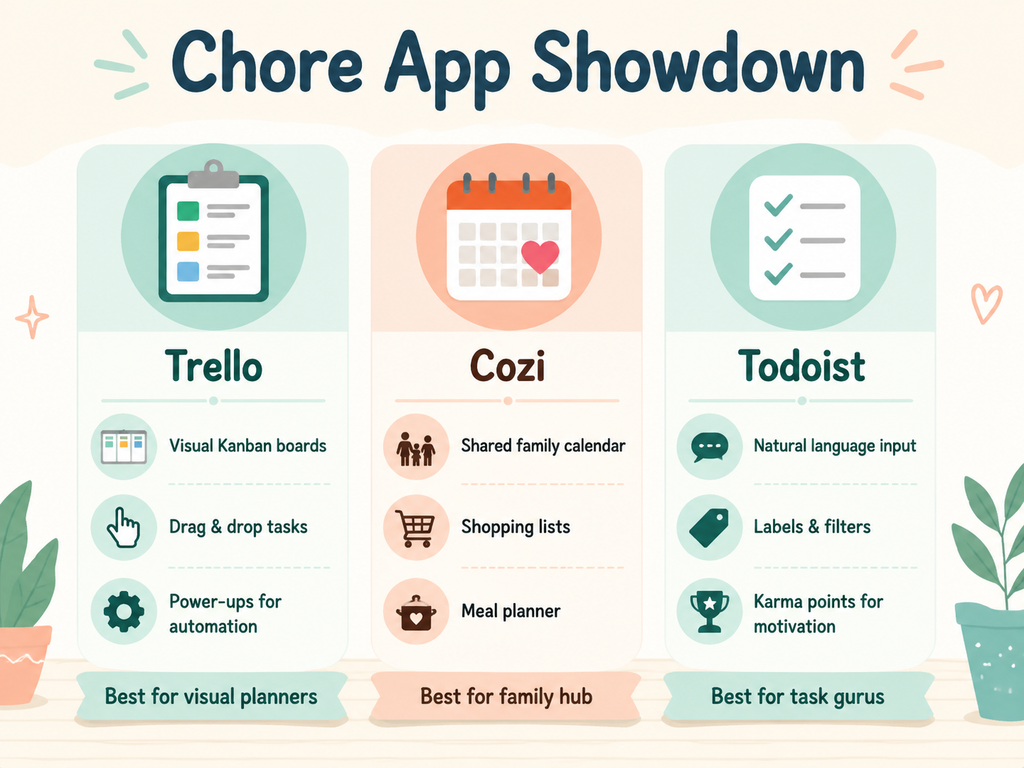
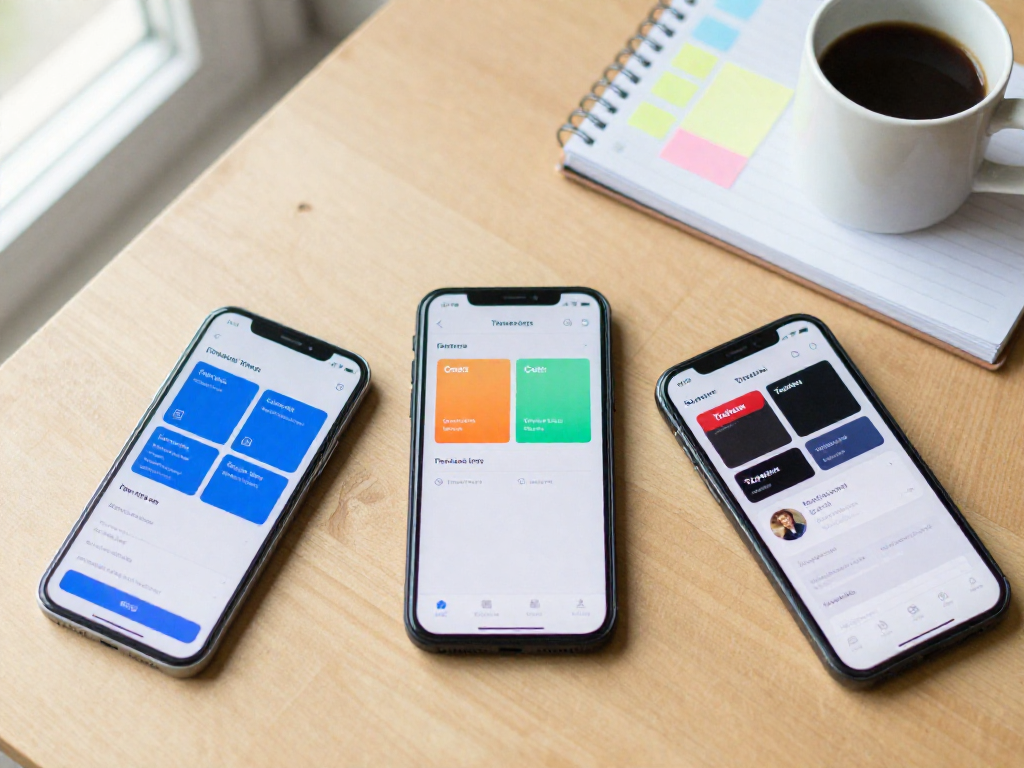
Picking a chore app as a couple isn’t about the fanciest features — it’s about the one you’ll both actually use when you’re bleary-eyed at 10 p.m. and the dishwasher still needs unloading. Trello, Cozi, and Todoist dominate the conversation, but they solve different problems. Here’s an honest, side-by-side look at how they handle the messy reality of batching chores across two busy adults.
Trello: The Visual Powerhouse for System-Builders
If your brain works in columns and cards, Trello will feel like home. Its Kanban boards let you build a chore pipeline — say, “To Do,” “Doing,” “Done” — with cards that hold checklists, due dates, attachments, and comments. Batching becomes intuitive when you create a card for “Saturday Morning Reset” and stuff it with sub-tasks for vacuuming, mopping, and bathroom wipe-downs. Drag a card to “Done” and watch it disappear; it’s deeply satisfying.
Trello’s secret weapon for couples is Butler automation. You can set rules like “When a card is added to ‘Weekly Chores,’ assign both members and set a due date for Friday.” Recurring tasks aren’t native, but Butler power-ups (in the free tier) let you clone cards on a schedule. The mobile app is snappy, though board-heavy setups can feel cramped on a phone screen. Gamification comes via stickers and custom card covers — light, but not a dedicated point system.
Best for: Tech-savvy couples who enjoy designing a visual system and don’t mind a small learning curve. Skip it if you want out-of-the-box simplicity; the blank canvas can be paralyzing.
Cozi: The Family Hub That Keeps It Simple
Cozi is built for busy families who don’t have time to tinker. At its core is a shared color-coded calendar where you can drop recurring chores like “Bryan: Take out recycling” every Monday. It nails simplicity: adding a repeating task takes four taps. The combined shopping list (with real-time sync) pairs perfectly with a chore batch like “Kitchen Cleanup” — check off scrubbing counters, then add “dish soap” to the list without switching apps.
Chore batching in Cozi relies on the shared to-do list. Create a list called “Weekend Power Hour” and add all tasks there; assign them to a person and due date. It’s not as flexible as Trello’s cards, but it’s dead easy. Collaboration is central — both partners see everything, and notifications are gentle nudges, not guilt trips. The ad-supported free version works fine, though the Gold subscription ($29.99/year) removes ads and adds calendar search.
Best for: Keep-it-simple families who want a joint calendar, grocery list, and chore list in one place without thinking about “project management.” Pass on it if you need sophisticated task dependencies or automation.
Todoist: The Productivity Geek’s Dream
Todoist is for couples who geek out over natural language input and want a tool that scales from “water the plants” to multi-step seasonal projects. Typing “vacuum living room every Sunday #chores p1 @Erin” instantly creates a high-priority recurring task assigned to your partner and filed under the “chores” label. The Karma system gamifies completion with points and streaks — a surprising motivator when you’re locked in friendly competition with your spouse.
Batching shines through Todoist’s filters and labels. Create a filter like “@weekend_batch & #partner_chores” to see all weekend tasks at once, then power through them. Project templates let you build a “Spring Deep Clean” list once and duplicate it every year. Recurring tasks are best-in-class, with options for every X days, every second Saturday, or after a task is completed. The mobile app is fast and minimal, and offline sync works reliably. The free tier limits you to 5 projects, but for most couples, that’s plenty for Home, Work, and a shared Tasks project.
Best for: Productivity enthusiasts who love tweaking tags, filters, and streaks. Avoid it if either partner finds the interface intimidating — without buy-in, the system collapses.
The Real-Decision Checklist
Ease of setup: Cozi (minutes) > Todoist (an hour with templates) > Trello (planning session needed).
Recurring tasks: Todoist > Cozi > Trello (requires Butler workaround).
Collaboration: Cozi (family-first design) = Trello (cards shared naturally) > Todoist (works but feels more individual).
Gamification: Todoist (Karma points) > Trello (stickers) > Cozi (none).
Mobile experience: Todoist = Cozi (clean, task-focused) > Trello (boards can be pinchy).
Batching muscle: Trello (cards as batches) > Todoist (filters/labels) > Cozi (lists only).
Pick Trello if you want to design a chore workflow that mirrors a mini project board, Cozi if you’ll use it only if it’s brain-dead simple, and Todoist if you treat task management like a hobby. The wrong choice is whichever one your partner secretly resents. So download two, run a trial week, and drop the one that feels like homework.
The 3-Step Framework to Build Your Own Digital Chore Batching System
Setting up a batching system isn’t about hunting for the perfect app—it’s about a stone-simple framework that works inside any tool you already use. The three steps below turn your shared chore list into a machinery that hums along without nightly negotiation.
Step 1: Categorize by Frequency and Domain
Sit down together and brain-dump every recurring task onto a single list. Then sort them into buckets: daily (dishes, counters, pet feeding), weekly (bathrooms, floors, garbage), monthly (HVAC filter, car wash), and seasonal (gutter check, window washing). Next, tag each by domain—indoor, outdoor, errands, or admin. This dual lens is what makes batching possible later.
Inside your app, reflect these cuts with labels or lists. In Trello, create separate boards or lists for each frequency and use colored labels for domains. In Cozi, build a master to-do list, then assign each chore a category like “Daily Quick Hit” or “Weekend Heavy.” In Todoist, create top-level projects (Daily, Weekly, Monthly) and use labels like @outdoor or @errands. Spend 20 minutes on this once, and you’ll never wonder where to place a new chore again.
Step 2: Batch into Fixed Time Blocks
The magic of batching comes from grouping similar-domain or similar-effort chores into two or three weekly slots. For most couples, a “Sunday Reset” and a “Wednesday Win” hit the sweet spot. Sunday Reset might bundle bathrooms, floors, dusting, and meal prep—deep cleaning that resets the house. Wednesday Win catches up on laundry, grocery list building, and a 15-minute tidy. Pairing a heavy block with a lighter midweek one prevents the weekend from becoming a grind.
Build these blocks inside your app as recurring containers, not one-off tasks. In Trello, create a card for each block with a checklist of subtasks; set the card to repeat weekly via Butler automation. In Cozi, set up a recurring to-do list called “Sunday Reset,” assign it to both partners, and enable a push notification 30 minutes before. In Todoist, craft a project named “Weekly Blocks” with two sections (Sunday Reset, Wednesday Win), each holding recurring tasks due on that day. The block itself becomes non-negotiable calendar time.
Step 3: Assign and Rotate Ownership
Evenly splitting a single block rarely works—it fragments the session. Instead, assign entire blocks to one person and rotate. One week you own Sunday Reset, your partner owns Wednesday Win; swap next week. This keeps anyone from getting saddled with the same scrubbing forever.
Use your app’s assignment features to make rotation obvious. In Trello, add both members to the board, then add a “Current Owner” custom field to each block card and update it on rotation day. Cozi lets you assign a task list to a specific family member—just toggle the name every Sunday. In Todoist, use a unique label like @partner1 and @partner2; add the relevant label to each block, and change them when you rotate. Set reminders that ping the owner’s phone at block start. Over time, the rotation becomes a low-drama rhythm.
Once live, run the system for two weeks, then do a 10-minute audit: move any mis-categorized chores, cut blocks that feel too dense, and tweak timing. With this framework, you’ve got a shared, always-current view of what must get done—zero nagging required.
Troubleshooting: Why Couples Quit Their Digital Chore System (and How to Fix It)
Most couples bail on their digital chore system not because the tool is wrong, but because it gets cluttered fast. The fix is ruthless simplicity: cap your board at three to five categories and no more than ten repeating tasks. If a chore has a note longer than the task itself, it's probably two chores. Cut it.
Systems die when they lose touch with real weeks. Block a ten-minute review on the last Sunday of the month—no big audit, just a quick check: “What are we skipping? What feels one-sided?” Then tweak. While you’re there, add the invisible work. Schedule “plan weekly meals,” “restock diapers,” or “book vet appointment” right into the app. Those are chores, too.
Make the review a ritual—a recurring chore date with coffee or wine. It’s fifteen minutes that stops the system from becoming one more thing you both ignore.
Beyond Apps: Automating Chores with Alexa and Zapier
Once your core batching system runs smoothly, you can layer on automation to reduce friction further. Alexa voice commands can add items to your shared grocery list while your hands are full. Zapier can auto-create recurring chore cards from your templates—say, a “Wipe countertops” task every evening—so nothing falls through the cracks. These are optional icing; start simple and add automation only where it truly saves you effort.
Your First Step Tonight: A 15-Minute Digital Setup
Stop reading and choose the app that felt most natural during the comparison. You only need one — don't overthink it. Open it right now and create exactly three recurring batch tasks: trash and recycling on the same evening, a weekly kitchen reset, and a joint grocery list update before the weekend. That's all. Assign them to whoever owns each batch, set a recurring due date, and put your phones down. Finally, block a five-minute check-in every Sunday — same time, no exceptions — to tweak the list and acknowledge what got done. This mini-routine is the whole system. Tonight, you've built the scaffold for a quieter, less chaotic week.
See also
- The Sunday Power Hour: How to Batch Cook for the Week
- How to Create a Family Binder with Digital and Paper
- The Ultimate Weekly Reset Checklist for Working Parents
- How to Divide Household Chores Fairly Without a Fight
Related articles
Batching Deep Cleaning: A Monthly Map for Working Families
How do I batch deep cleaning tasks into one weekend per month?
Jul 31, 2026 · 9 min read
The 'One Touch' Rule: A Minimalist Approach to Daily Tidying
How can the 'one touch' decluttering rule streamline my family's tidying?
Jul 31, 2026 · 4 min read
Speed Cleaning Secrets: A Listicle of Hacks for Busy Families
What are the most effective quick-cleaning tricks for a family home?
Jul 31, 2026 · 4 min read